Every project says it’s on track.Flowr tells you which ones are.

Business case, plan, budget and timesheets in one control system, so status comes from evidence rather than optimism.

Early access. Teams are invited progressively.
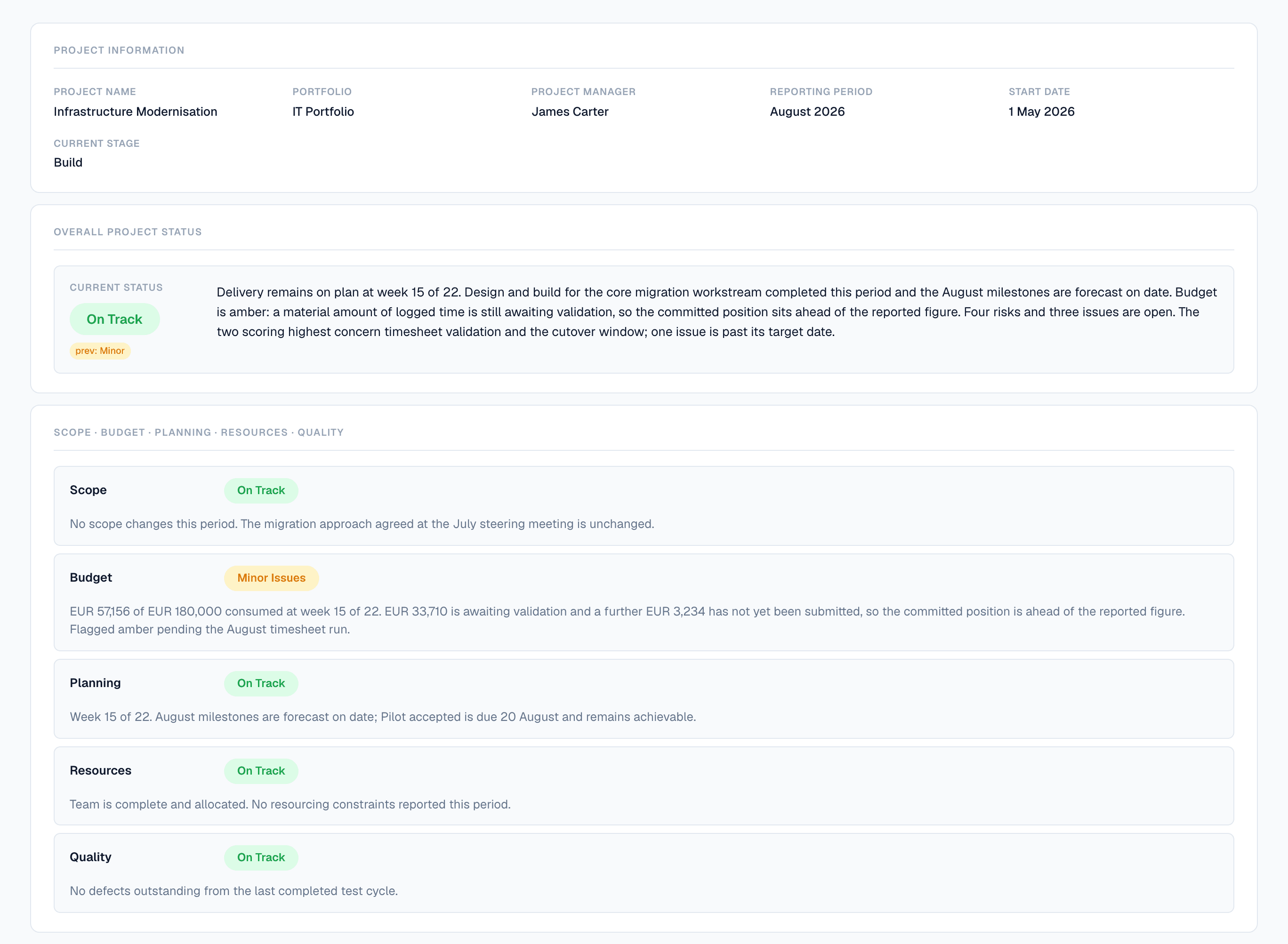
A submitted Flowr status report for Infrastructure Modernisation, August 2026. Overall status On Track, with a chip showing the previous period was Minor. The narrative states the project is at week 15 of 22 and that the forecast is 4.5 percent over the approved budget, inside the 5 percent tolerance, after supplier work authorised at the Build gate. Separate ratings follow for Scope, Budget, Planning, Resources and Quality; Budget is amber, and its paragraph reports 145,971 euros incurred of 192,000 approved, a forecast of 200,651 at completion, 28,492 awaiting validation, and a variance of 20,603 against the cost baseline.
Submitted by the project team, and candid about itself: an amber budget, four open risks, one issue past its date. It still concludes that delivery is on plan, because that part is a judgement and not a measurement. Flowr makes the measurement too.

You already know the reporting is fiction.

Not because anyone is lying. By the time a report is wrong enough to notice, the money is spent.

Today
Status typed from memory, once a week
Every manager reports amber differently
Overspend surfaces at month-end
Last quarter rebuilt from a spreadsheet
In Flowr
Status assembled from plan, budget and time
One threshold, applied to every project
Effort compared to progress, continuously
Closed periods frozen, not re-derived

A project doesn’t go off track in one week. It goes quietly.

Flowr watches the gap between what a project reports and what its own data says.

How the delivery signal works
Progress reportedEffort consumed
0%25%50%75%100%wk 1wk 5wk 10wk 1530 points apart by week 1066%94%

A diagram, not a screen. Flowr makes this comparison continuously and tells you which side of your threshold a project has landed on. It does not draw the curve.

  • Delivery signal

    A task can be 60% finished and have used 90% of its hours. Flowr notices, and tells you which tasks. What you do about it is your call.

  • Actuals from recorded time

    Submitting a week counts its hours as actual cost. You are not waiting on an approval queue to find out what a project has spent. Approving it records who checked and never moves the total.

  • Nothing clears itself

    When Flowr flags something, you either say why it is fine or you fix it. Either way your answer is on the record, and the flag stays until you give one.

  • Explained, not just flagged

    Every flag comes with the numbers behind it: which task, how many hours, how big the gap. You can check it yourself before you act on it.
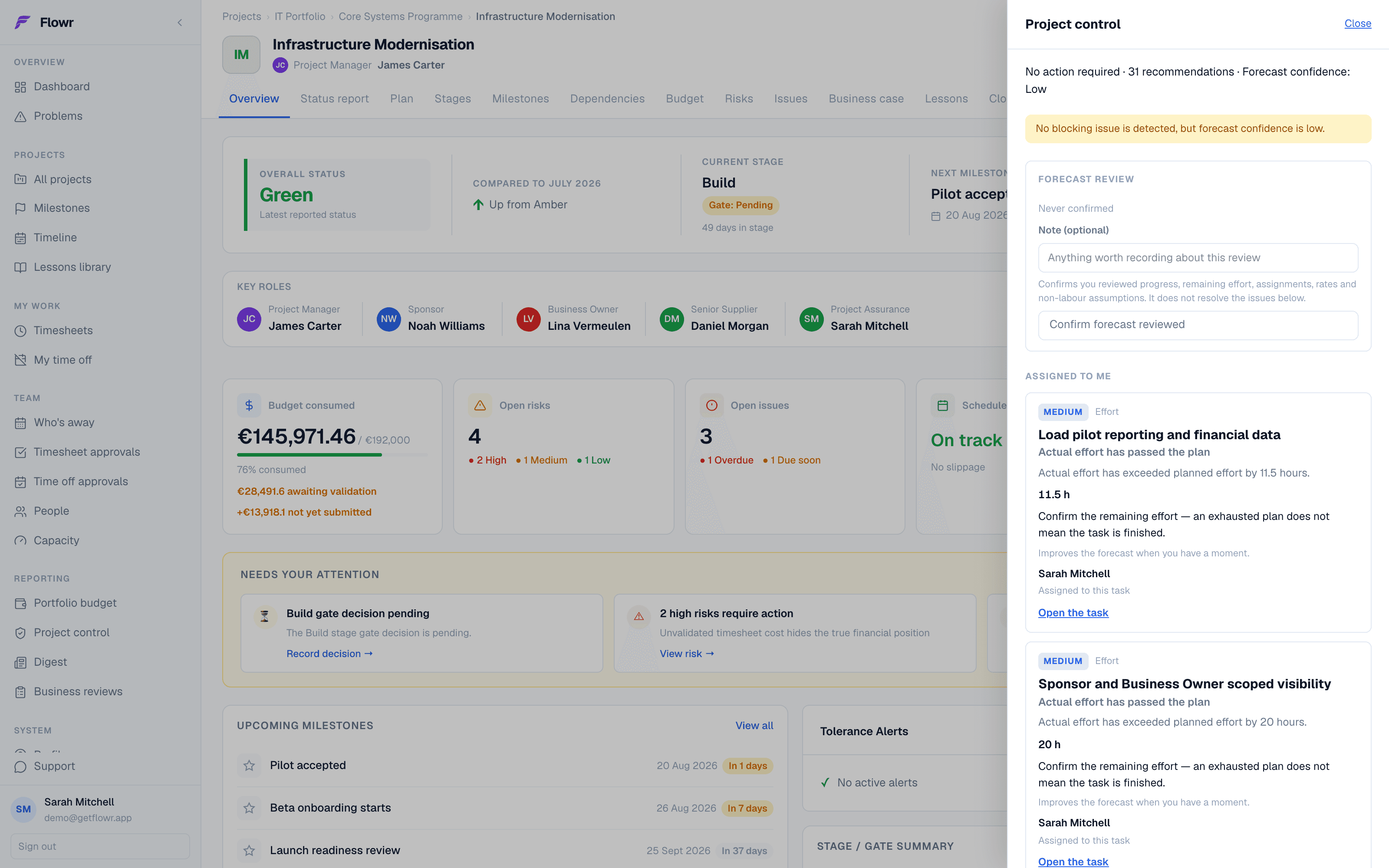
A Flowr project overview with the control drawer open. The drawer reports thirty-one recommendations and low forecast confidence, then two effort findings assigned to the reader, each naming the hours by which actual effort has passed the plan. Behind it the project shows 145,971 euros consumed of 192,000 approved, with 28,492 awaiting validation, four open risks of which two are high, and three open issues.
Flowr identifies the problem, explains what led to it, and links directly to the task, budget line or reporting period it came from.

Decide once what off track means.

Set the rule at organisation level. Flowr applies it to everything, without anyone having to remember.

  • Tolerance thresholdsBusiness

    How much overrun, how many days of slippage, before green stops being green.

  • Stage templates

    Define your stages once, and have them applied to every new project. Which of them need a gate before work continues is part of the template.

  • Roles and responsibilities

    Every project records who is sponsor, business owner, assurance. Fifteen PRINCE2 and PMI roles ship with Flowr, and you can add your own if your organisation names them differently.

  • Being responsible is not being allowed

    Naming someone assurance on a project lets them see it. It does not let them edit, approve or administer anything. That stays with their access role.
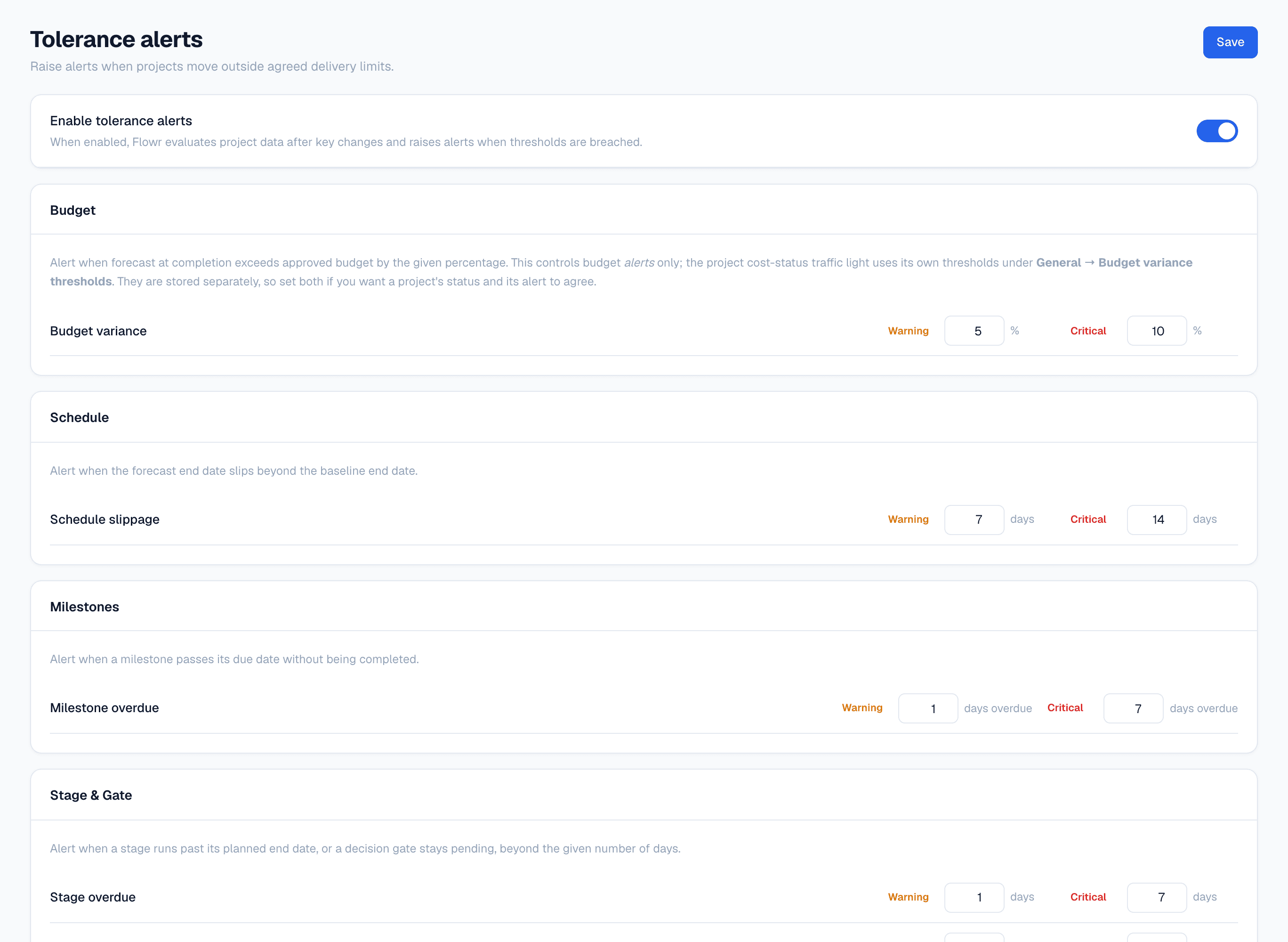
Flowr's tolerance settings. A master switch enables the alerts, and beneath it cards for Budget, Schedule, Milestones and Stage and Gate, each with a Warning and a Critical threshold — budget variance 5 and 10 percent, schedule slippage 7 and 14 days, milestone overdue 1 and 7 days.
Set once for the organisation, and every project is measured against them. Warning and critical are two numbers because deciding to watch something and deciding to stop it are two decisions. A project 7% over budget has passed the first and not the second.

It starts before the plan and ends after the last task.

01
02
03
04
05
06
07
08
Business caseStages & gatesPlan & baselineDeliveryControlPeriod closeReviewClosure

What Flowr covers, from the business case through to closure. The stages a project runs through are your own. You set the list, and which of them need a gate before work continues.
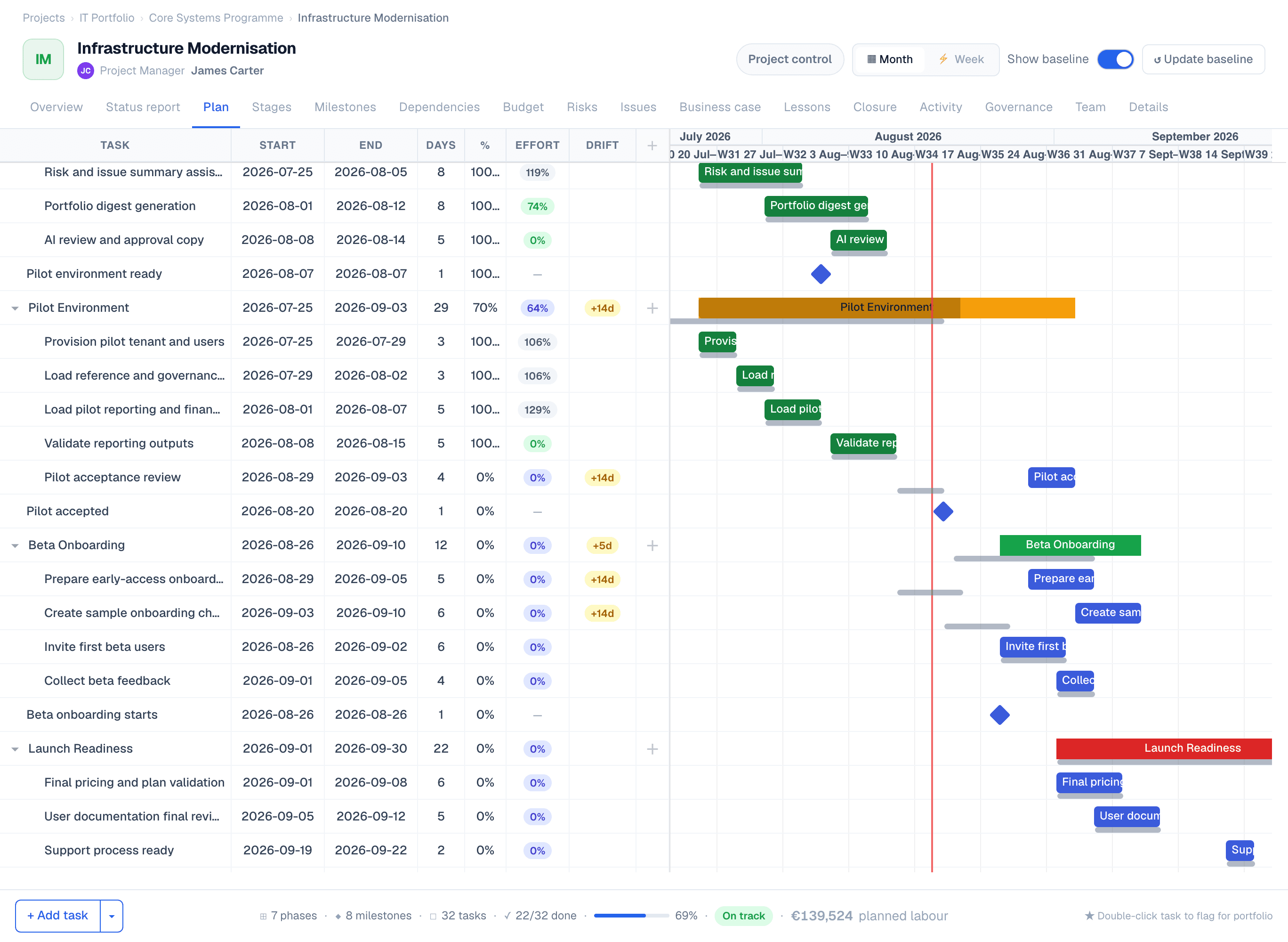
A Flowr plan. The grid on the left carries start, end, days, percent complete, effort and drift for every task; the chart on the right shows the bars against a today marker, with a grey baseline bar beneath each one. Three tasks and a phase are flagged plus fourteen and plus five days of drift. The footer reads seven phases, eight milestones, thirty-two tasks, twenty-two of thirty-two done, sixty-nine percent, on track, and 139,524 euros of planned labour.
The plan against the baseline it was approved on. Grey is what was agreed. The DRIFT column says how far each task has moved since: two weeks on the pilot, a week on beta onboarding. The €139,524 in the footer is that same plan priced, and it is where the cost baseline comes from.

When someone asks how you got that number, you’ll have an answer.

The cost is calculated from the timesheets and the rates in force when the work was done. The budget it’s measured against is a record of who approved what, and when. Neither is a number somebody typed to make the total work.
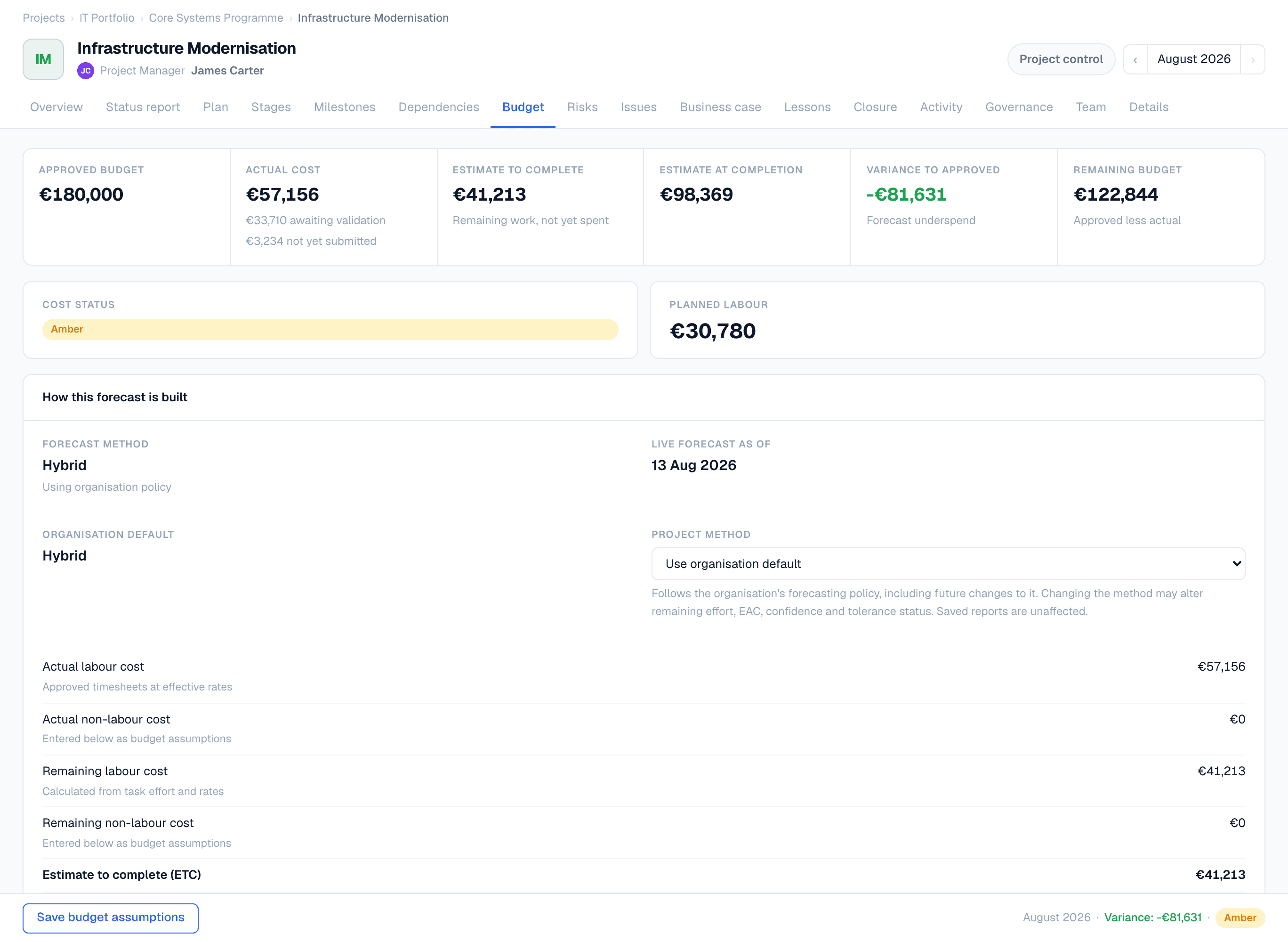

Flowr's budget page. Across the top: approved budget 192,000 euros, actual cost 145,971, estimate to complete 54,680, estimate at completion 200,651, variance to approved plus 8,651 — a forecast overspend of 4.5 percent — and variance to baseline plus 20,603, above plan. Budget status is green because the forecast is inside the 5 percent tolerance. Below, the approved budget's change history: a 12,000 euro increase for additional supplier work agreed at the Build gate review, approved by the Steering Committee under reference SC-2026-07.
The forecast sits €20,603 above the baseline plan, but only 4.5% above the approved budget. €12,000 of that difference was authorised at the Build gate, and the record on the right says who approved it and when.
A card headed What changed, comparing 1 July 2026 with 18 August 2026. The estimate at completion increased by 51,979 euros, made of plus 57,979 of new actuals — newly recorded cost — and minus 6,000 from a change in the remaining non-labour assumptions.
The forecast rose €51,979 between July and August. €57,979 of cost was recorded in that time, and the remaining supplier work was re-estimated €6,000 lower. The card gives the total and the two movements behind it, so nobody has to work backwards from last month’s report.
  • Two references, not one

    Over the plan and over the budget are different problems. Flowr reports both, so an increase somebody authorised does not read as an overrun.

  • A budget with a history

    Every change records who approved it outside Flowr, on what date, against which reference. Nothing is overwritten.

  • A baseline you do not type

    Take a baseline and Flowr prices the plan behind it, then freezes the figure. Correcting a rate next year cannot restate what you committed to.

  • Periods that actually close

    Numbers and snapshot captured at close, uneditable after. Reopening is recorded.

Flowr does not support multi-currency today. A portfolio that spans currencies is reported one currency at a time, and Flowr will not convert between them. A guessed exchange rate is worse than two honest numbers. If you consolidate in a single currency, that is the gap to know about before you start.

Eleven status decks, or one list.

The Projects table on Flowr's portfolio budget page. Three rows: Infrastructure Modernisation, approved 192,000 euros, actual 145,971.46, current forecast 200,651.46, variance plus 8,651.46 in red; Customer Portal Revamp, approved 200,000, forecast 90,930.24, variance minus 109,069.76 in green; Billing Platform Migration, approved 295,000, forecast 256,951.48, variance minus 38,048.52, forecast completion 15 December 2026 marked plus 46 days. Each project name carries a low confidence chip. The last column, Last PSR, reads 2026-08 for the first project and Never for the other two.
Each row carries the figures that project reports on its own budget page. Infrastructure Modernisation’s €200,651 is the number from the screen above, not a copy of it. Two of these projects have never filed a status report, and the last column says Never where it could have said nothing.
  • Milestones across projects

    What's late, what's next, what's critical. All in one place.

  • CapacityBusiness

    Where workload is building, with approved leave and holidays already taken out.

  • Budget roll-up

    Portfolio and programme totals from live project data.

  • Business reviews

    Publish it and it's the version of record. One at a time, enforced by the database.
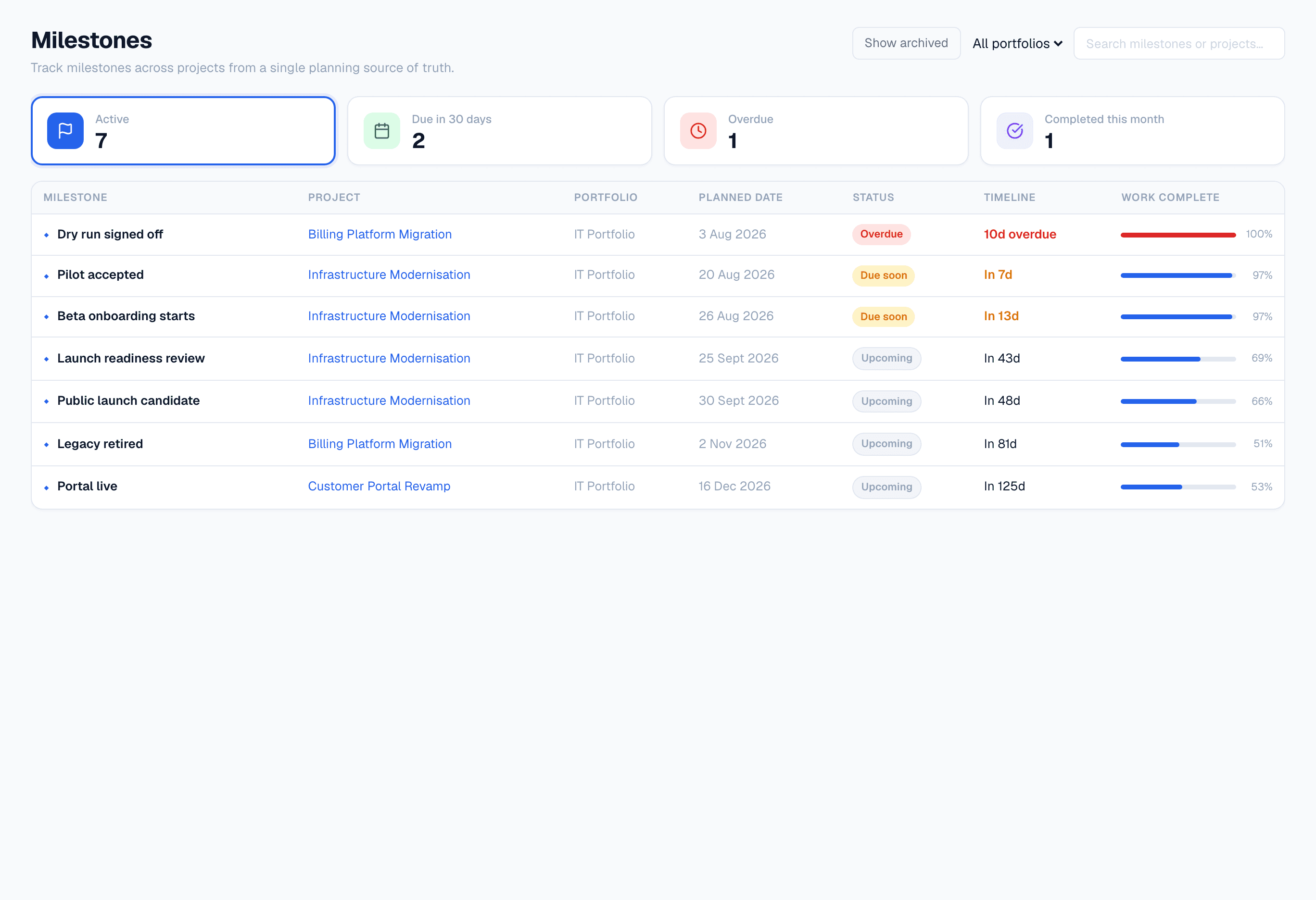
Flowr's cross-project milestone list. Counters read seven active, two due in thirty days, one overdue, one completed this month. The table lists each milestone with its project, portfolio, planned date, status and a Work complete bar. The overdue row, Dry run signed off, shows a hundred percent of its work complete.
Every milestone in the portfolio on one list. Read the top row: Dry run signed off is ten days overdue with 100% of the work due before it complete. The work landed and nobody signed the gate, which is the kind of thing a status deck never says.

It writes the first draft. You still sign it.
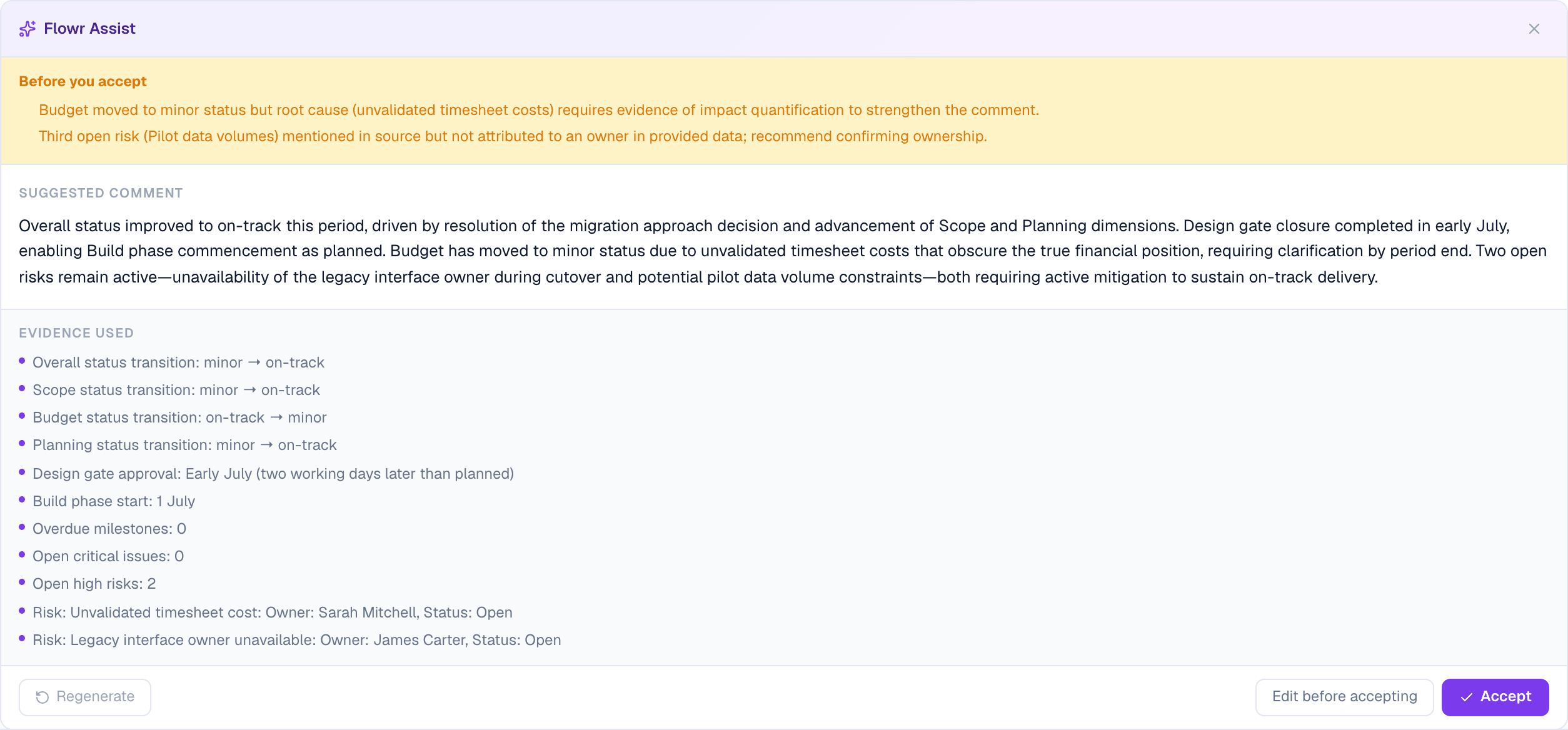
Flowr Assist drafting a status comment. An amber banner headed Before you accept raises two objections to its own draft: the budget sentence needs evidence of impact, and a third risk is named without an owner. Below it, the suggested comment. Below that, an Evidence used list of eleven items — status transitions for Overall, Scope, Budget and Planning, the design gate approval date, the build phase start, zero overdue milestones, zero open critical issues, two open high risks, and two named risks with their owners. The footer offers Regenerate, Edit before accepting, and Accept.
A real suggestion, with the eleven facts it was written from listed underneath: status transitions, gate dates, open risks and who owns them. The amber banner is Flowr objecting to its own draft, because the budget sentence has no impact figure behind it and a risk it mentioned has no owner. You accept, edit or regenerate; nothing reaches the report by itself. An administrator can switch AI off for the whole organisation, and no AI request can be made after that. Assist is Business tier, the portfolio digest Scale.

It exists because the tool it replaces is three tools and a deck.

A project manager keeping cost in a spreadsheet, the plan in a task tool and the board’s version in slides. Three places, none of which could say where a number came from. Flowr is the attempt to hold all three in one system that can show its working.

  • Where it runs

    The application and its database run in Azure West Europe. Each organisation's data is separated at the database level, and what a person can reach is decided by their role, not by which link they were sent. Sign-in, payments and AI use providers outside that boundary; the privacy policy names them.

  • Recovery is rehearsed

    Not assumed. Point-in-time restore history is 7 days; the last rehearsal restored the database in 4m06s and reached a validated application in about 12 minutes.

  • Leaving is self-serve

    The whole organisation exports as JSON whenever you want it. No request, no notice period, no fee, and nothing you have to ask us to release.

Everything Flowr does, marked by the plan it needs, is on the features page.

See it against your own projects.

Teams are invited progressively. Your 14-day trial starts when you create your workspace.

This page is a tour, not an inventory. Dependencies, lessons learned, business cases, closure, capacity, timesheet approvals, imports and the rest are on the features page, listed in full and marked by the plan each one needs.

Does this replace Jira or Asana?

No. Those run the work; Flowr controls the project. Most teams keep both.

Can I bring what I already have?

Projects, risks and issues import from CSV or Excel, with a preview before anything is written.

Can I get my data back out?

Status reports export to a print-ready PDF. The full organisation export is JSON, self-serve, any time. A published business review has no PDF export yet — that's on the list, and we'd rather say so.

What if I only run three projects?

Solo is €12 a month for one person, with up to five projects running at once. Each of them gets the whole lifecycle: the plan, the budget, the forecast, the risks, the reporting and the closure.

Where does the data live?

Azure SQL in the EU, with organisation-level separation and role-based access control.

Flowr — project controls for PMOs